
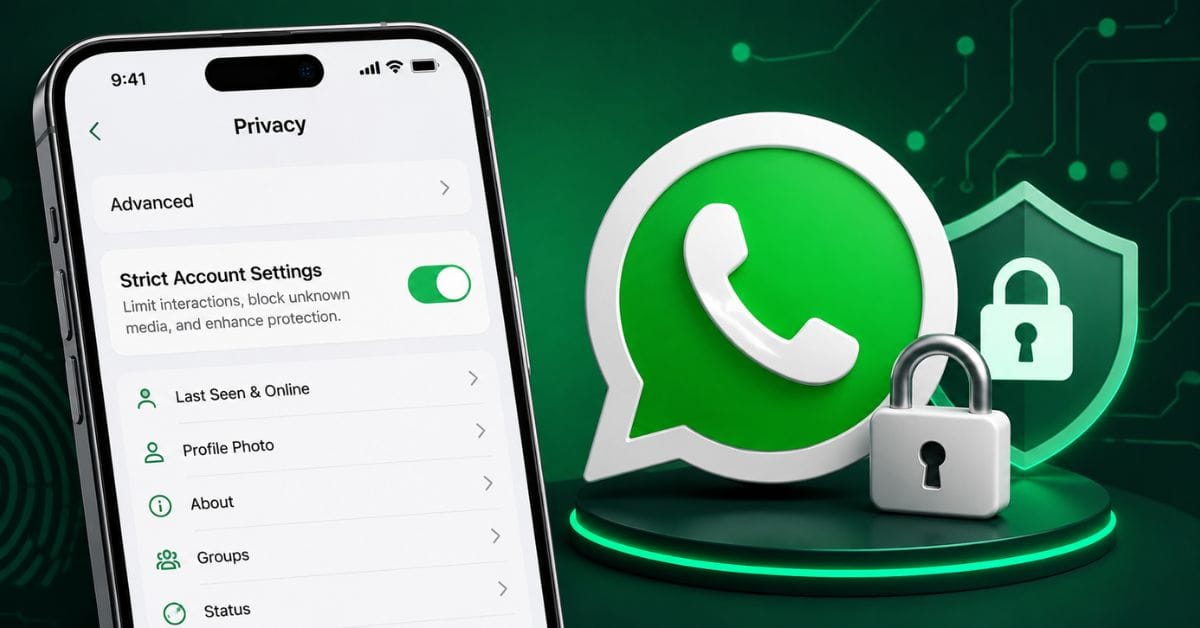
WhatsApp has introduced a new privacy and security feature in 2026 that is trending globally and in India. The latest update is called Strict Account Settings, a high-security mode designed to protect users from cyberattacks, spam, phishing links, and unknown contacts. This new mode is currently becoming popular as users search for “WhatsApp new mode setting” and “WhatsApp trending setting 2026.”
The feature is especially important for Indian users because WhatsApp remains one of the most used messaging apps in the country for personal chats, business communication, and payments.
What Is WhatsApp’s New Mode Setting in 2026?
The new setting is officially called Strict Account Settings. It is a lockdown-style privacy mode that automatically enables stronger account protections with one tap.
When users turn this mode on, WhatsApp applies multiple advanced security settings automatically. According to reports, this includes blocking attachments and media from unknown contacts, silencing calls from unknown numbers, disabling link previews, and enabling stronger account verification settings.
This feature is aimed mainly at people who may face higher security risks, such as journalists, business owners, public figures, and users worried about scams or spyware.
Key Features of WhatsApp Strict Account Settings
Better Privacy Controls
After enabling this mode, WhatsApp makes your account more private by default. Several visible details become restricted to contacts only.
This includes:
- Profile photo visibility
- Last seen and online status
- About section
- Group add permissions
Unknown users also face stricter communication limits.
Stronger Security Protection
The new mode automatically turns on security-focused settings such as two-step verification and security notifications.
This means:
- Extra PIN protection is enabled
- Login protection improves
- Security code change alerts are activated
These steps reduce the risk of hacking, account theft, and unauthorized access.
Spam and Scam Reduction
India has seen a rise in scam calls, OTP fraud, and phishing attempts through messaging apps. WhatsApp’s new mode directly targets these risks.
With this setting enabled:
- Suspicious media from strangers is blocked
- Unknown calls are silenced
- Harmful preview links are disabled
This lowers exposure to malicious content.
How to Enable WhatsApp New Mode Setting
Users can activate the feature manually from the app settings.
Follow these steps:
Open WhatsApp Settings
Go to Settings inside WhatsApp.
Tap Privacy
Open the Privacy section.
Open Advanced
Scroll down and tap Advanced.
Enable Strict Account Settings
Turn on the new toggle called Strict Account Settings.
WhatsApp says this feature can only be enabled from your main device and not from companion devices like desktop or web versions.
Why This Update Matters in India
India is WhatsApp’s largest market with hundreds of millions of users. The platform is widely used for chatting, customer support, business marketing, payments, and education.
Because of this large user base, India also faces many WhatsApp-related fraud cases. Scam messages, fake job offers, phishing links, and impersonation attacks are common.
Read More : Apple iOS 26.5 Update 2026 Released
This new security mode matters because it gives users a simpler way to secure accounts without manually changing many privacy settings.
For business users and creators, this can improve trust and reduce spam interactions.
What Happens Next?
WhatsApp is rolling out Strict Account Settings gradually in 2026. Not all users may see it immediately.
Users should:
- Update WhatsApp to the latest version
- Check Privacy > Advanced regularly
- Watch for future Meta announcements
More security-focused updates are expected later in 2026 as messaging platforms face increasing privacy pressure.




Leave a Comment
Your email address will not be published. Required fields are marked *